
In the competitive digital landscape of 2026, generic AI-generated content is no longer enough to rank. Search engines and savvy readers demand authenticity, factual accuracy, and content that reflects a genuine brand voice. Many businesses struggle to scale their content creation without sacrificing quality, leading to thin, uninspired articles that fail to engage or convert. The challenge is clear: how do you automate content production while ensuring every piece is authoritative, on-brand, and grounded in your unique business knowledge?
This is where a new generation of AI tools is making its mark. Introducing the AIRAG pSEO Agent, an all-in-one AI Content Engine designed specifically for WordPress. It moves beyond simple text generation by combining the power of flagship Large Language Models (LLMs) with your site’s specific data, creating a content strategy that runs on autopilot. This is not just another AI writer; it’s a system designed to turn your WordPress site into a dynamic, AI-driven powerhouse that gets cited in search.
Table of Contents
- Key Takeaways
- What is AIRAG pSEO Agent? An All-in-One AI Content Engine
- The RAG Revolution: How AIRAG Uses Your Data for Factual Content
- Harnessing Multi-Model AI: The Power of OpenAI, Gemini & Grok
- Core Features: Your WordPress Content on Autopilot
- How AIRAG Aligns with Google’s E-E-A-T and Helpful Content Guidelines
- Real-World Applications: How Different Businesses Use AIRAG
- Your First Article: A Step-by-Step Walkthrough
- Built for WordPress Professionals: Security, Performance, and Standards
- Frequently Asked Questions
Key Takeaways
- AIRAG pSEO Agent uses Retrieval-Augmented Generation (RAG) technology to create factually accurate content based on your own website data, PDFs, and images.
- It offers multi-model AI access, letting you strategically choose between Gemini for deep context, GPT for creative flair, and Grok for real-time information.
- Features like Video-to-Blog and an autonomous scheduler with WP-Cron integration fully automate the WordPress content workflow, from ideation to publishing.
- The plugin is designed to align with Google’s E-E-A-T and Helpful Content guidelines by producing original, expert-driven content instead of generic AI text.
- It is built with a security-first approach, adhering to WordPress coding standards to ensure stability and safety for professional websites.
What is AIRAG pSEO Agent? An All-in-One AI Content Engine
AIRAG pSEO Agent is a sophisticated WordPress plugin that functions as a complete AI content engine. Its primary purpose is to automate the generation of high-ranking, SEO-optimized blog posts that are factually grounded in your own business data. Unlike other plugins that offer generic AI writing capabilities, AIRAG pSEO Agent integrates deeply with your website’s existing content to ensure every article is authentic, authoritative, and speaks with your unique brand voice.
The system is designed to drive rankings on autopilot. By combining access to multiple flagship LLMs with your unique knowledge base, it transforms your WordPress site into a self-sustaining content powerhouse. This approach ensures that the content not only targets relevant keywords but also builds topical authority, provides real value to your audience, and generates articles with high citeability for modern AI-powered search results.
The RAG Revolution: How AIRAG Uses Your Data for Factual Content
The core technology that sets AIRAG pSEO Agent apart is Retrieval-Augmented Generation (RAG). RAG is an advanced AI technique that enhances the quality and accuracy of content by grounding it in verifiable facts. While a standard AI model generates text based on its vast but general training data, a RAG-enabled system first retrieves relevant information from a specific knowledge base and then uses that information to inform its output.
In practical terms, AIRAG pSEO Agent scans your designated pages, uploaded PDFs, and even image metadata to build a private, secure knowledge base unique to your business. This process is powered by creating vector embeddings from your content, which allows the AI to understand the semantic meaning and relationships within your unique data, far beyond simple keyword matching. When you prompt it to create a blog post, it searches this knowledge base for the most relevant facts, product details, or brand messaging. This retrieved information is then provided to the LLM as a factual foundation, ensuring the final article is accurate, on-brand, and free from the “hallucinations” that plague other AI tools.
This move from generic AI to factually grounded content is critical for modern SEO. By grounding content in factual data via RAG, websites can better target featured snippets and AI-powered overviews, which often rely on verifiable information.
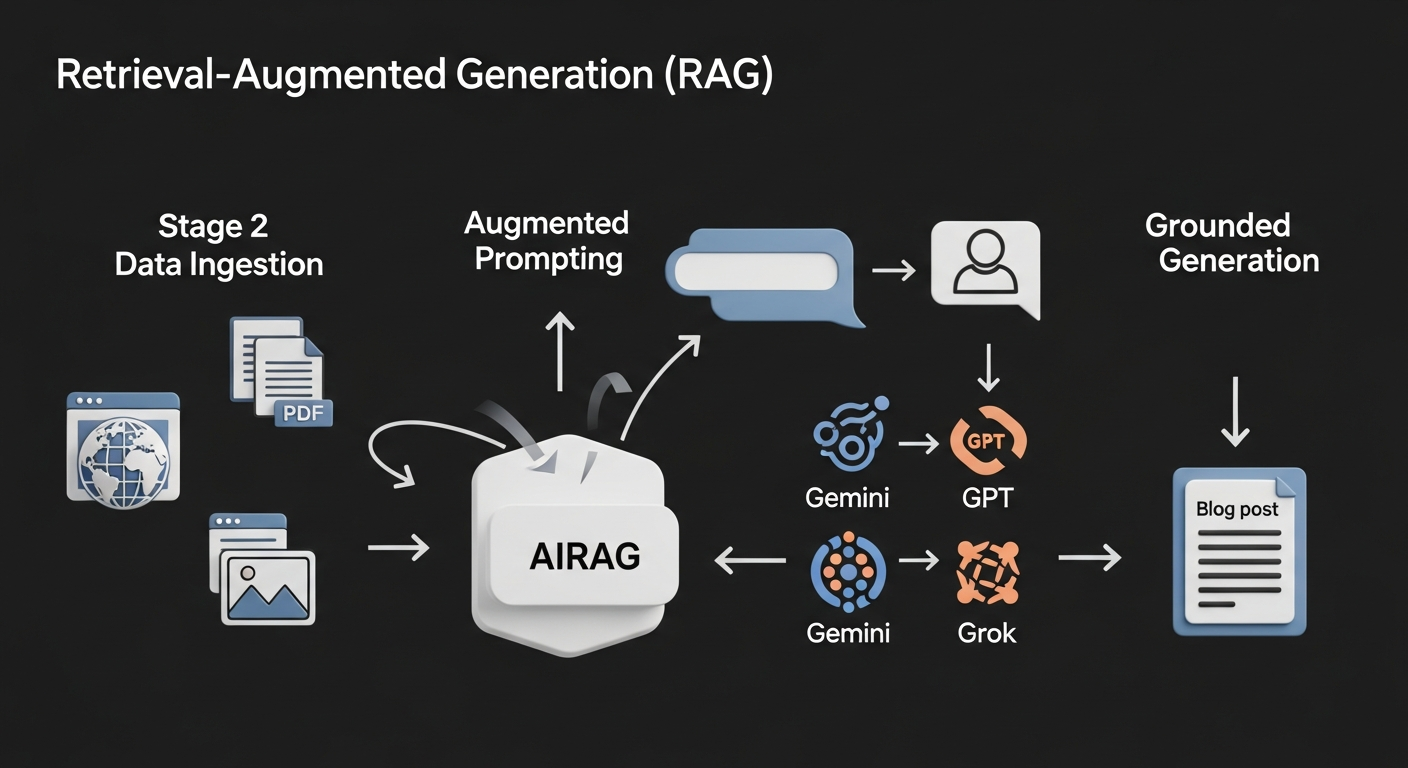
Harnessing Multi-Model AI: The Power of OpenAI, Gemini & Grok
A one-size-fits-all approach to AI is no longer sufficient for a sophisticated content strategy. Different AI models excel at different tasks. AIRAG pSEO Agent acknowledges this by providing multi-model AI support, allowing you to switch between flagship LLMs directly from your WordPress dashboard to suit the specific needs of each content piece.
Strategic Model Selection: When to Use Gemini, GPT, or Grok
This flexibility is a significant advantage. You can leverage each model’s unique strengths:
- Use Gemini when: Your source knowledge base is extremely large, and you need the article to synthesize complex, interconnected concepts. Gemini’s massive context window makes it ideal for creating comprehensive pillar pages or in-depth technical guides that draw from dozens of internal documents.
- Use GPT when: Your goal is a top-of-funnel article with a highly creative and engaging narrative style. GPT’s strength in creative writing is perfect for crafting compelling stories, marketing copy, or blog posts where brand voice and readability are the top priorities.
- Use Grok when: You are writing about a recent industry trend, a news event from the past 24 hours, or a topic that requires real-time data. Grok’s ability to access current information makes it indispensable for creating timely, relevant content that positions you as a thought leader.
Core Features: Your WordPress Content on Autopilot
Beyond its advanced AI core, AIRAG pSEO Agent is equipped with a suite of powerful features designed to automate every aspect of your content workflow.
Turn YouTube Videos into SEO Articles
The Video-to-Blog Intelligence feature transforms any YouTube URL into a long-form, SEO-optimized article. The AI doesn’t just transcribe the video; it analyzes the transcript, context, and visual metadata to create a comprehensive, well-structured blog post that captures the essence of the video content and is ready to rank in search engines.
A key strategy to consider: For the highest quality articles, use YouTube videos that have human-verified captions. This provides the AI with a cleaner, more accurate transcript, which directly results in a more coherent and factually precise blog post.
Automate Your Content Calendar with WP-Cron
The Autonomous Schedule Manager allows you to automatically generate and publish SEO-optimized posts on a recurring schedule (daily, weekly, or monthly) using WordPress’s native WP-Cron system. This ‘set it and forget it’ functionality ensures a consistent stream of fresh content without manual intervention. It’s an essential tool for executing a programmatic SEO strategy or building topical clusters over time.
Maintain a Consistent Global Brand Voice
The Global Brand Voice controls support over 40 languages, allowing you to maintain brand consistency across international markets. With precise settings for Audience Level (from beginner to expert) and Tone (from casual to formal), you can ensure every piece of content, regardless of language, aligns perfectly with your established brand identity.
How AIRAG Aligns with Google’s E-E-A-T and Helpful Content Guidelines
In today’s SEO climate, simply producing content is not enough. Google’s emphasis on E-E-A-T (Experience, Expertise, Authoritativeness, Trustworthiness) and its Helpful Content system rewards content that is original, insightful, and created for people first. Generic AI content often fails this test, but AIRAG pSEO Agent is specifically designed to meet these modern standards.
By using RAG to draw from your own first-party data—your case studies, product specs, internal research, and expert articles—the plugin generates content that inherently demonstrates experience and expertise. It’s not creating text from a general pool of internet knowledge; it’s articulating *your* knowledge. This directly addresses Google’s call for content that provides unique value and avoids repeating what is already widely available. This methodology helps in fact-checking AI content from the very beginning, ensuring the output is a trustworthy reflection of your business.
Real-World Applications: How Different Businesses Use AIRAG
The true power of AIRAG pSEO Agent is its versatility. Here’s how different types of businesses are leveraging it to achieve their goals.
For E-commerce Stores: Scaling Product Guides
An e-commerce store selling high-tech cameras can upload their internal product specification sheets, user manuals, and technician guides as PDFs into the AIRAG knowledge base. They can then prompt the system to generate a series of helpful articles like “How to Choose the Right Lens for Your DSLR” or “A Beginner’s Guide to Setting Up the Model X-200”. The RAG system ensures every detail, from sensor size to battery life, is pulled directly from the official spec sheets, creating 100% accurate buying guides that build consumer trust and rank for long-tail keywords.
For Digital Marketing Agencies: Managing Client Content
An agency managing SEO for 10 different clients can use AIRAG to streamline content production. For each client, they create a dedicated knowledge base with the client’s website pages and marketing materials. Using the Autonomous Schedule Manager, they can set up a unique content calendar for each client (e.g., a law firm gets one in-depth legal analysis post per week, while a local bakery gets two lighthearted posts about new products). This allows the agency to scale its content services efficiently while ensuring every article is perfectly on-brand for each client.
For Niche Bloggers: Building Topical Authority
A blogger focused on sustainable gardening can use the Video-to-Blog feature to convert a series of expert interviews from their YouTube channel into a topical cluster of blog posts. By feeding the URLs of videos on “Composting Basics,” “Organic Pest Control,” and “Rainwater Harvesting,” they can quickly generate a comprehensive, interconnected series of articles. This rapidly builds topical authority on the subject, signaling to Google that their site is an expert resource, all while repurposing their existing video content for a new audience.
Your First Article: A Step-by-Step Walkthrough
Getting started with AIRAG pSEO Agent is designed to be intuitive. Here’s a simple walkthrough from setup to publishing your first AI-generated, fact-grounded article.
- Installation and Setup: After installing the plugin, the first step is to configure your settings. This includes connecting your preferred LLM APIs (OpenAI, Gemini, or Grok) and defining the default language, tone, and audience level for your content.
- Building Your Knowledge Base: This is the most crucial step. Navigate to the AIRAG knowledge base section. Here, you can select which pages, posts, or custom post types on your site should be included for the RAG system to scan. You can also upload external documents like PDFs, which is perfect for product manuals or white papers.
- Configuring the Autonomous Scheduler: If you want to automate publishing, go to the scheduler. Here you can create a new schedule, define the topics or keywords you want to target, set the publishing frequency (e.g., every Monday at 9:00 AM), and choose which AI model to use for this specific schedule.
- Generating a Single Article: For a one-off post, go to the ‘Generate New Post’ screen. Enter your topic or keyword. Select the specific knowledge base sources you want to use for this article. Choose your AI model—for example, select GPT for a creative intro, then perhaps switch to Gemini to analyze data from an uploaded PDF for the body.
- Review and Publish: Once the article is generated, it will appear as a draft in your WordPress posts. It’s always a best practice to give it a human review to ensure it perfectly matches your strategic goals. You can then publish it just like any other WordPress post.
Common Pitfalls and How to Avoid Them
- Mistake: Using an overly broad knowledge base. If you select every single page on your site for a very specific article, the RAG system may pull irrelevant information. Solution: Curate a specific set of pages or upload a targeted PDF relevant to the article’s topic. This ensures the RAG system retrieves precise, helpful information.
- Mistake: Relying 100% on automation from day one. While the automation is powerful, it’s wise to supervise it initially. Solution: Manually review the first 3-5 generated articles to fine-tune the tone, audience level, and prompt settings. This small upfront investment ensures long-term quality and brand alignment.
Built for WordPress Professionals: Security, Performance, and Standards
AIRAG pSEO Agent is not just powerful; it’s built the WordPress way. It was developed with a deep respect for the WordPress ecosystem, ensuring seamless integration, robust security, and optimal performance.
Adherence to WordPress Coding Standards
The plugin fully follows official WordPress coding standards. It utilizes native WordPress functions, hooks, filters, the REST API, and AJAX. This guarantees maximum compatibility and prevents conflicts with other well-coded themes and plugins, ensuring long-term site stability.
A Security-First Approach
Security is paramount. The plugin is built with WordPress security best practices at its core, including consistent input sanitization to prevent malicious code injection, the use of nonces to verify that requests are legitimate and intentional, and proper capability checks to ensure users can only perform actions they have permission for.
Optimized and Lightweight Performance
AIRAG pSEO Agent is designed to be efficient. It uses AJAX for dynamic dashboard interactions and the native WP-Cron system to handle heavy tasks like content generation in the background. This architecture minimizes server load and ensures your website remains fast and responsive for your visitors.
Frequently Asked Questions
Here are answers to some common questions about the AIRAG pSEO Agent.
What makes AIRAG pSEO Agent different from other AI writers like Jasper or Copy.ai?
The key differences are its deep integration with WordPress and its core technology. AIRAG pSEO Agent uses Retrieval-Augmented Generation (RAG) to ground content in your own website’s data, ensuring factual accuracy and brand alignment. It also offers multi-model support (Gemini, GPT, Grok) and full automation via its WP-Cron scheduler, making it a complete content engine rather than just a writing assistant.
How does the Retrieval-Augmented Generation (RAG) feature actually work?
RAG works in two steps. First, when you request an article, the system retrieves the most relevant information from your private knowledge base (your site pages, PDFs, etc.). Second, it provides this retrieved information to the AI model along with your prompt. This gives the AI the specific, factual context it needs to write an accurate and authoritative article tailored to your business.
Will this plugin slow down my WordPress website?
No. AIRAG pSEO Agent is engineered to be lightweight and efficient. It leverages background processing using WordPress’s native WP-Cron and AJAX technologies. This means heavy tasks like content generation happen behind the scenes, minimizing any impact on your server’s resources and ensuring your site remains fast for visitors.
How does the Autonomous Scheduler work with WP-Cron?
The scheduler uses WP-Cron, the built-in task scheduler for WordPress. You define a content plan and a publishing frequency (e.g., two posts per week). The scheduler then adds these tasks to the WP-Cron queue, which automatically triggers the content generation and publishing process at the set intervals without you needing to be logged in.
Is the lifetime license a one-time payment?
Yes, the current offer is for lifetime access with a single, one-time payment. This provides ongoing access to the plugin’s features and updates without any recurring subscription fees. For more information about the product and its creators, Shahisoft, please see the official about page.
Ready to transform your WordPress content strategy? Businesses are leveraging AIRAG pSEO Agent to save hours, boost SEO, and dominate their niche. Purchase today for a one-time payment and get lifetime access.