
WordPress RAG Content Generator Setup: The 2026 Complete Guide
The wordpress rag content generator setup powered by AIRAG pSEO Agent enables WordPress sites to automatically produce high-ranking, knowledge-grounded articles by combining retrieval-augmented generation with multiple large language models including Gemini, GPT, and Grok. This configuration scans existing pages, PDFs, and images to ensure every output stays factually anchored in site-specific data while supporting autonomous scheduling through WP-Cron.
Table of Contents
- WordPress RAG Content Generator Setup Fundamentals
- AIRAG pSEO Agent Installation and RAG Index Configuration
- Configuring Multi-Model AI Switching in Your WordPress RAG Setup
- Autonomous Scheduling and Publishing Workflows
- Video-to-Page Intelligence Implementation
- Pro Tips for Effective WordPress RAG Content Generator Setup
- Common Pitfalls in WordPress RAG Content Generator Setup
WordPress RAG Content Generator Setup Fundamentals
A wordpress rag content generator setup relies on retrieval-augmented generation to ensure every output remains anchored to your site specific knowledge base. This prevents generic hallucinations common in standard AI tools and produces content that search engines and AI overviews can cite reliably. In modern business practice, organizations use this approach to maintain brand accuracy while scaling content production.
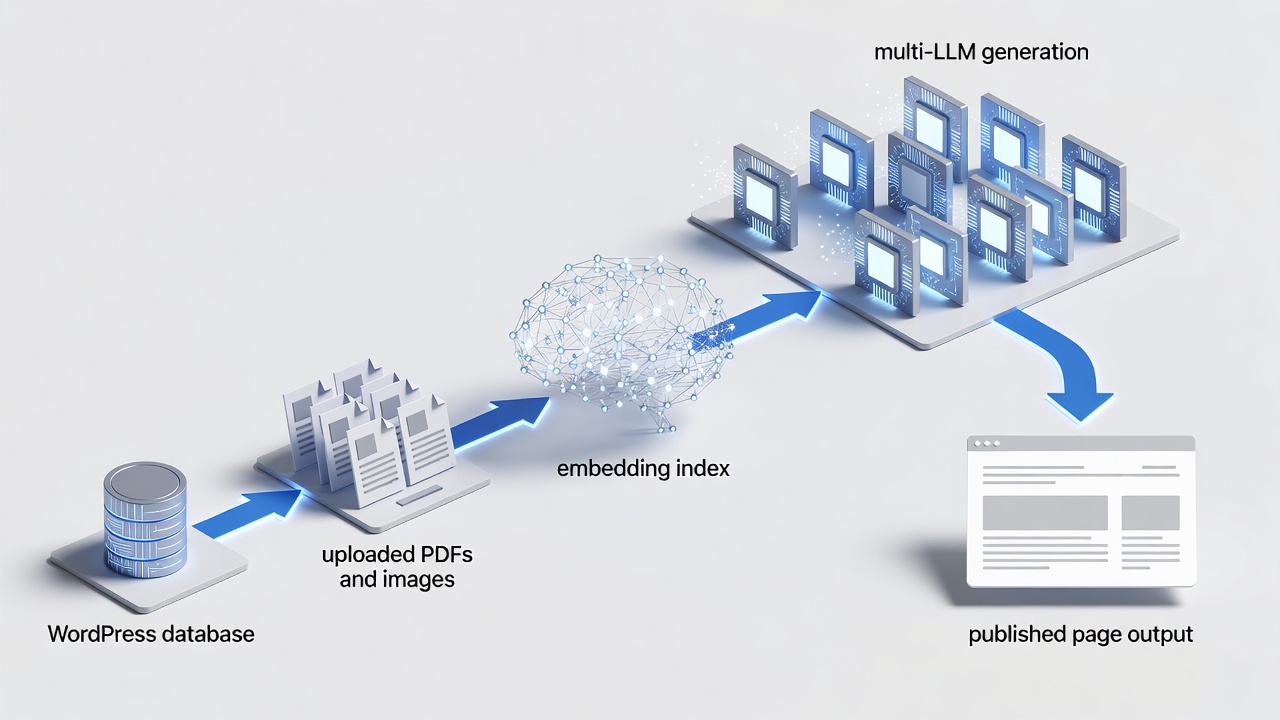
Core RAG Pipeline Components
The pipeline begins with indexing site content, PDFs, and images. Retrieved chunks then feed into the selected LLM for generation while preserving original meaning and terminology from your materials. According to industry standards, this grounding step is essential for compliance and citation readiness in 2026 AI search environments.
Multi-Model LLM Integration Points
Integration points allow seamless switching between models directly inside the WordPress dashboard, matching each task to the model strengths without leaving the plugin interface. In real-world implementations, teams assign heavy-context tasks to one model and creative refinements to another for optimal efficiency.
AIRAG pSEO Agent Installation and RAG Index Configuration
AIRAG pSEO Agent installation follows standard WordPress plugin activation. After activation, users upload documents to build the initial RAG index that powers all future content generation. The plugin fully follows WordPress coding standards and uses hooks, filters, REST API, and AJAX to ensure seamless integration.
Plugin Activation and License Activation
Activation requires a valid license key entered once in the plugin settings panel. The process uses WordPress hooks and nonces to maintain security throughout. Built with WordPress security best practices, input sanitization and capability checks keep your site safe during the entire setup.
Knowledge Base Upload Process
Users drag and drop PDFs, images, and existing pages into the knowledge base uploader. The system automatically chunks and embeds the material for fast retrieval during generation. This step creates the factual foundation required for every subsequent article produced by the wordpress rag content generator setup.
Configuring Multi-Model AI Switching in Your WordPress RAG Setup
The wordpress rag content generator setup supports dynamic model selection so teams can assign Gemini to large-context pillar pages, GPT to creative variations, and Grok to logic-heavy topics. This flexibility delivers both scale and precision from a single secure dashboard.
Gemini Large Context Workflows
Gemini handles datasets exceeding one million tokens, making it ideal for enterprise hub pages that reference hundreds of internal documents. In modern business practice, this capability reduces manual research time significantly.
GPT Creative Variation Settings
GPT excels at tone adjustments and audience-level adaptations while staying strictly within the retrieved source material. Precise controls for audience level and tone support consistent brand voice across 40+ languages.
Grok Real-Time Logic Triggers
Grok processes real-time logic requirements when content needs current data validation alongside the static knowledge base. This combination keeps outputs both accurate and up to date.
| Model | Best Use Case | Context Window | Recommended Frequency |
|---|---|---|---|
| Gemini | Massive dataset pillar pages | 1M+ tokens | Weekly enterprise hubs |
| GPT | Creative variations and tone control | 128k tokens | Daily blog posts |
| Grok | Real-time logic and validation | 128k tokens | Event-driven updates |
Autonomous Scheduling and Publishing Workflows
The wordpress rag content generator setup uses WP-Cron to execute defined publishing cadences without manual intervention after initial strategy configuration. The Autonomous Schedule Manager allows users to define content strategy once, after which the system handles generation and publishing daily, weekly, or monthly.
WP-Cron Strategy Definition
Users define content volume, target categories, and model preferences once. WP-Cron then triggers generation and publication automatically. This optimized and dynamic approach minimizes server load while ensuring consistent output.
Daily Weekly Monthly Cadence Examples
High-volume sites often schedule daily posts, while enterprise hubs publish weekly. Monthly schedules suit seasonal or research-intensive topics. The scheduler integrates directly with WordPress core functions for reliability.
Ready to activate your own wordpress rag content generator setup?
Video-to-Page Intelligence Implementation
The wordpress rag content generator setup accepts any YouTube URL and converts transcripts plus visual metadata into complete, optimized articles ready for publication. Video-to-Page Intelligence transforms any YouTube URL into a long-form, SEO-optimized article by analyzing transcripts and visual metadata.
YouTube URL Ingestion Process
Paste the video URL into the dedicated field. The system extracts the full transcript and relevant visual cues automatically. This feature extends the capabilities of the core RAG engine beyond static documents.
Transcript and Metadata Optimization
The engine aligns transcript segments with your existing knowledge base to produce content that remains both video-accurate and site-consistent. Results stay grounded in your proprietary data while incorporating fresh video insights.
Pro Tips for Effective WordPress RAG Content Generator Setup
In real-world implementations of a wordpress rag content generator setup, successful teams maintain regular knowledge base updates to keep retrieval accuracy high. Combine multiple models strategically and review a sample of generated pages before scaling volume. Leverage the unified programmatic and blog automation features to connect landing hubs with ongoing content drip campaigns.
Common Pitfalls in WordPress RAG Content Generator Setup
A common mistake businesses make is uploading incomplete or outdated source materials, which leads to inconsistent retrieval results. Another frequent issue is failing to define clear scheduling cadences, resulting in irregular publishing. Always verify license activation and test nonce-protected endpoints during initial setup to avoid security-related interruptions.
Next Steps for Your WordPress RAG Content Generator Setup
Connect with a specialist for wordpress rag content generator setup here: https://airagpseo.com/
Related resources: Home | Blog | Privacy Policy
