
WordPress RAG Content Generator Setup (2026) | AIRAG pSEO Agent
A WordPress RAG content generator setup connects your site existing pages, PDFs, and images to multi-model AI so every generated article stays factually grounded while supporting programmatic SEO at scale. AIRAG pSEO Agent delivers this capability through Retrieval-Augmented Generation that indexes your unique business data before any content is produced.
Table of Contents
- WordPress RAG Content Generator Setup Fundamentals
- AIRAG pSEO Agent Core Architecture
- Step-by-Step WordPress RAG Content Generator Setup
- Autonomous Scheduling and Publishing Controls
- Video-to-Page Intelligence Implementation
- Enterprise-Scale Programmatic SEO Patterns
- Common Pitfalls During WordPress RAG Setup
- Pro Tips for Maximizing AIRAG pSEO Agent Output Quality
WordPress RAG Content Generator Setup Fundamentals
What Retrieval-Augmented Generation Means for WordPress Sites
Retrieval-Augmented Generation retrieves relevant passages from your own WordPress content before the language model writes new text. This approach keeps every page accurate and aligned with your brand data instead of relying on generic training knowledge. In modern business practice, site owners who implement a WordPress RAG content generator setup see improved topical authority because the generated material directly references existing assets such as service descriptions, case studies, and product documentation.
According to industry standards, grounding AI output in proprietary data reduces factual errors and strengthens SEO signals. The process begins when the plugin crawls approved sources and stores vector embeddings that the selected LLM consults during generation. This retrieval step ensures that every new programmatic page maintains consistency with the original voice and facts of the website.
Why AIRAG pSEO Agent Uses Your Existing Site Data
AIRAG pSEO Agent scans your pages, PDFs, and images during the WordPress RAG content generator setup. The plugin then builds a secure internal index that every generated article references, eliminating hallucination risks common in standard AI tools. In real-world implementations, organizations that feed their complete knowledge base into the system report higher citation rates in AI Overviews and traditional search results.
The RAG mechanism operates by matching user-defined prompts against the indexed corpus before invoking any LLM. This guarantees that output remains tethered to verified information rather than external training data. A common mistake businesses make is attempting to generate content without completing the indexing phase, which leads to generic or inaccurate results that fail to rank.
AIRAG pSEO Agent Core Architecture
AIRAG pSEO Agent combines OpenAI, Gemini, and Grok inside one WordPress dashboard. Users select the model that best matches the task, Gemini for large context, GPT for creative tone, or Grok for real-time logic, without leaving the plugin interface. The architecture supports 40 plus languages and precise audience-level controls ranging from casual to formal.
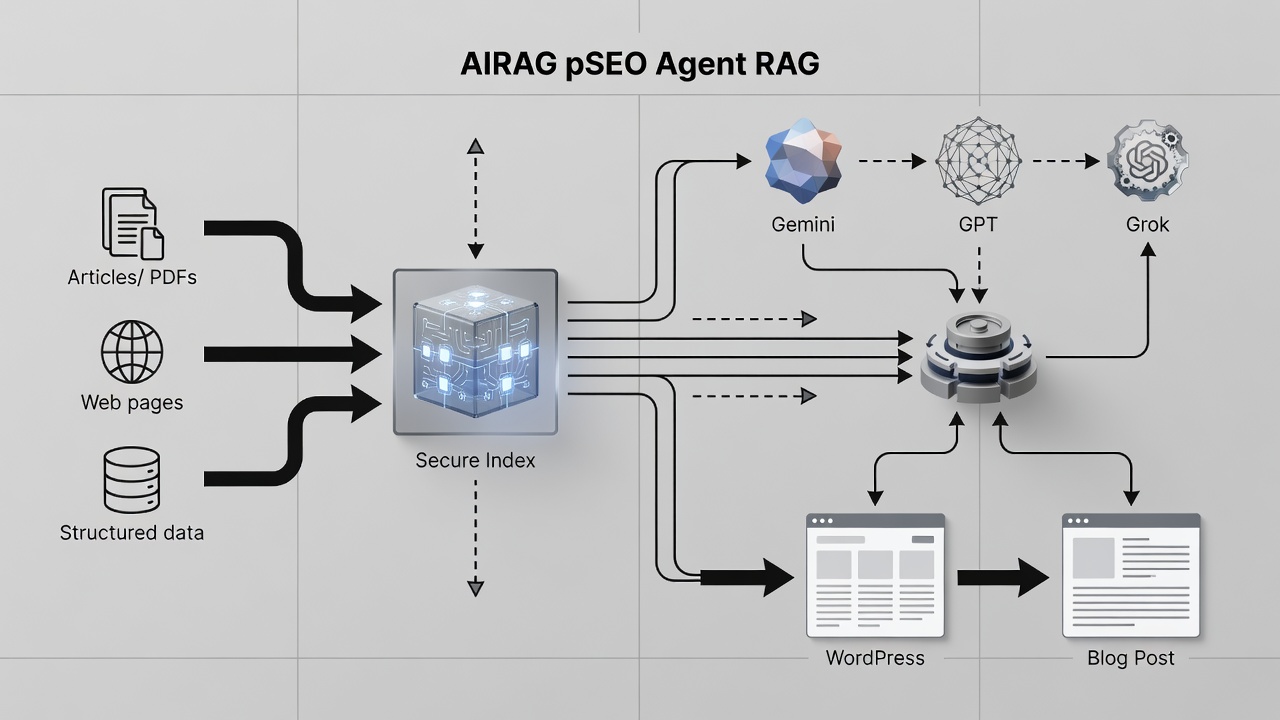
Multi-LLM Orchestration Layer
The orchestration layer routes each request to the chosen model while maintaining a single RAG index. This design lets site owners maintain consistent factual grounding across different writing styles. When configuring a WordPress RAG content generator setup, administrators can define default model preferences per content type, ensuring that directory pages leverage Gemini massive context window while blog posts utilize GPT creative capabilities.
Secure WordPress Hook and REST API Integration
AIRAG pSEO Agent follows WordPress coding standards using hooks, filters, REST API, and AJAX. Input sanitization, nonces, and capability checks protect the site throughout the WordPress RAG content generator setup. The plugin remains lightweight by relying on AJAX for dynamic updates and WP-Cron for scheduled tasks, minimizing server load while preserving full compatibility with existing themes and plugins.
Step-by-Step WordPress RAG Content Generator Setup
Plugin Installation and License Activation
Install AIRAG pSEO Agent from the WordPress dashboard, activate the license, and connect your preferred LLM API keys. The one-time purchase model removes recurring fees after activation. Once installed, the plugin registers its own menu where administrators define content sources, model preferences, and publishing schedules as part of the complete WordPress RAG content generator setup.
Knowledge Base Indexing of Pages PDFs and Images
Select the content sources you want indexed. The plugin crawls pages, processes PDFs, and extracts visual metadata to build the RAG index used for all future generations. In practice, teams often begin with high-value sections such as service pages and product documentation before expanding to historical blog posts. This phased approach ensures the WordPress RAG content generator setup produces immediately useful output.
Model Selection and Brand Voice Configuration
Choose default models and set audience level plus tone controls. Support for more than 40 languages ensures the WordPress RAG content generator setup matches global brand requirements. Administrators can override model selection on a per-generation basis, allowing the same knowledge base to fuel both technical white papers and conversational social posts.
Autonomous Scheduling and Publishing Controls
The WP-Cron scheduler lets you define content cadence once. AIRAG pSEO Agent then generates and publishes pages daily, weekly, or monthly without manual intervention after the initial WordPress RAG content generator setup. This autonomous manager integrates directly with the WordPress publishing workflow, assigning categories, tags, and internal links according to predefined rules.
Site owners frequently configure separate schedules for different content clusters. One schedule might handle weekly directory updates while another manages monthly deep-dive articles. The plugin logs each scheduled run, providing transparency into generation volume and publishing success rates.
Video-to-Page Intelligence Implementation
Paste any YouTube URL into the plugin. AIRAG pSEO Agent analyzes the transcript and visual metadata to produce a long-form, SEO-optimized article ready for immediate publishing. This feature transforms video content into text assets that reinforce topical clusters and support internal linking strategies within the WordPress RAG content generator setup.
The video analysis respects brand voice settings and pulls additional context from the indexed knowledge base. As a result, articles derived from videos maintain factual alignment with existing site material rather than introducing unrelated information.
Enterprise-Scale Programmatic SEO Patterns
| Model | Best Use Case | Context Window | Recommended For |
|---|---|---|---|
| Gemini | Large dataset grounding | 1M+ tokens | Enterprise directory pages |
| GPT | Creative tone variation | 128K tokens | Blog post series |
| Grok | Real-time logic | 32K tokens | News-style updates |
Enterprise teams often combine multiple models within a single campaign. The WordPress RAG content generator setup supports parent-child silo mapping that automatically links newly generated pages to existing pillar content, strengthening internal link equity across the domain.
Common Pitfalls During WordPress RAG Setup
- Skipping the initial knowledge base indexing step leads to ungrounded content that performs poorly in search and AI citations.
- Overlooking model selection results in mismatched tone or insufficient context for complex topics.
- Neglecting to re-index after major site updates causes the RAG engine to reference outdated information.
- Ignoring WP-Cron configuration prevents autonomous publishing and requires manual triggering for each batch.
In real-world implementations, teams that establish a clear content governance policy before beginning the WordPress RAG content generator setup achieve faster time-to-value and fewer revisions.
Pro Tips for Maximizing AIRAG pSEO Agent Output Quality
- Maintain regularly updated source content to achieve higher citation rates in AI Overviews and traditional rankings.
- Re-index the knowledge base after any significant content changes to keep the RAG engine current and accurate.
- Leverage the companion SEO Agent module to generate supporting blog posts that interlink with programmatic landing pages.
- Test multiple model combinations on a small content cluster before scaling to full production volume.
- Use the built-in analytics to monitor publishing success rates and adjust schedules accordingly.
According to industry standards, organizations that combine AIRAG pSEO Agent with a documented editorial review process produce the highest-performing programmatic content at scale.
Ready to launch your WordPress RAG content generator?
AIRAG pSEO Agent turns your existing data into high-ranking programmatic pages on autopilot.
Frequently Asked Questions
How long does initial knowledge base indexing take during WordPress RAG content generator setup?
Indexing time depends on the volume of pages, PDFs, and images. Most sites complete the process within minutes to a few hours using the secure WordPress dashboard tools.
Can I switch between Gemini, GPT, and Grok mid-campaign in the AIRAG plugin?
Yes. AIRAG pSEO Agent allows seamless model switching from a single dashboard so you can match the best LLM to each content type without restarting the WordPress RAG content generator setup.
Does AIRAG follow WordPress security best practices?
AIRAG pSEO Agent uses input sanitization, nonces, capability checks, and follows all WordPress coding standards for safe integration.
Connect with a specialist for WordPress RAG content generator setup support and start generating factually grounded pages today.
Connect with a Specialist for wordpress rag content generator setup here
Related resources: Home · Blog · My account · Privacy Policy
