
How to Set Up RAG Knowledge Base in WordPress
AIRAG pSEO Agent enables users to set up a RAG knowledge base in WordPress by scanning existing pages, PDFs, and images, then grounding all generated content in that proprietary data through OpenAI, Gemini, or Grok models for accurate, citation-ready output.
Table of Contents
- AIRAG pSEO Agent RAG Architecture Overview
- Step-by-Step RAG Knowledge Base Configuration
- Common Pitfalls When Building WordPress RAG Systems
- Pro Tips for Maximizing RAG Performance in WordPress
AIRAG pSEO Agent RAG Architecture Overview
AIRAG pSEO Agent uses Retrieval-Augmented Generation to connect flagship LLMs directly to a site’s unique content. The plugin scans WordPress pages, PDFs, and images to create a grounded knowledge base that prevents hallucinations and ensures every article remains factually accurate.
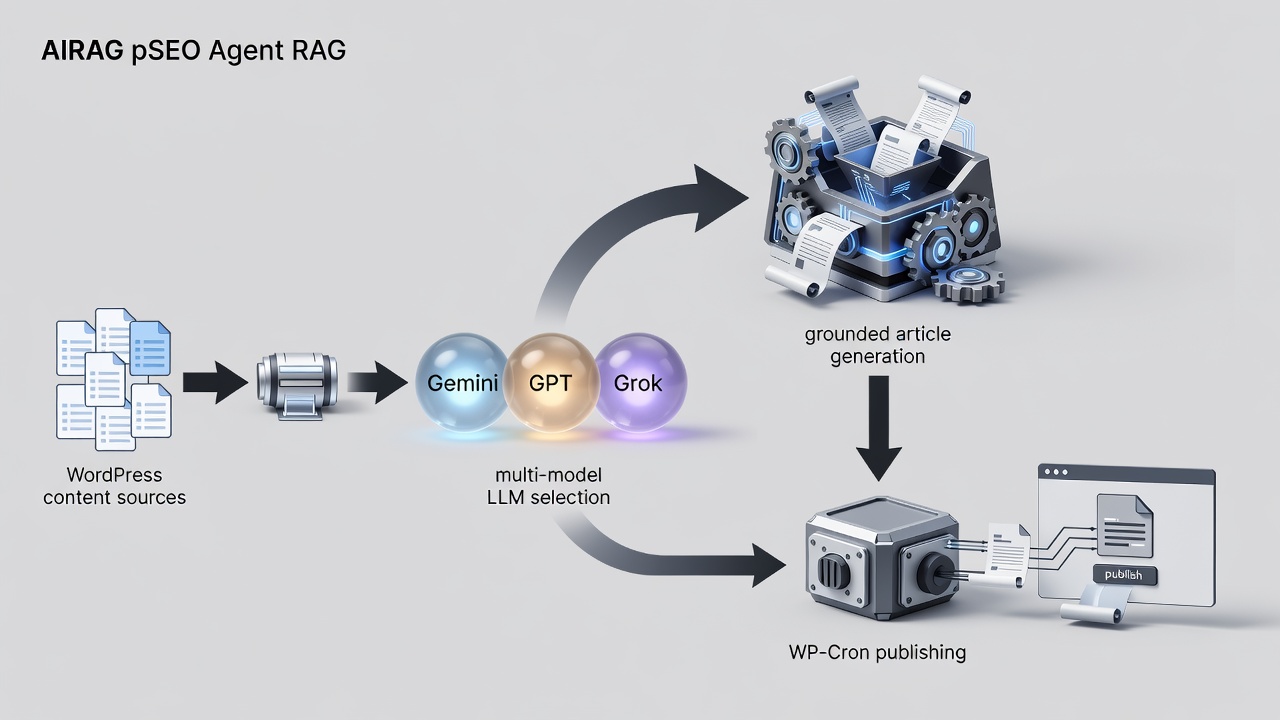
Step-by-Step RAG Knowledge Base Configuration
Install and Activate the Plugin
Download AIRAG pSEO Agent from the official site and install it through the WordPress dashboard. Activate the plugin to unlock the RAG knowledge base controls.
Connect Multi-Model LLMs
Navigate to the plugin settings and add API keys for OpenAI, Gemini, and Grok. Select the preferred model based on context needs or creative requirements.
Define Knowledge Sources
Choose the pages, PDFs, and images to include in the RAG knowledge base. The plugin automatically indexes these assets for future content generation.
| Model | Best Use Case | Context Window | WordPress Integration Method |
|---|---|---|---|
| Gemini | Massive document sets | Largest | Native plugin selector |
| GPT | Creative article tone | Large | Native plugin selector |
| Grok | Real-time logic queries | Medium | Native plugin selector |
Ready to activate RAG on your WordPress site? Purchase AIRAG pSEO Agent for lifetime access and start generating grounded content today.
Common Pitfalls When Building WordPress RAG Systems
In real-world implementations, many users overlook proper source selection, which leads to incomplete knowledge bases. Always verify that all critical PDFs and images are included before scheduling content generation.
Pro Tips for Maximizing RAG Performance in WordPress
According to industry standards, combining Gemini for broad context with GPT for tone refinement produces the highest quality output. Schedule daily WP-Cron updates to keep the RAG knowledge base current with new site content.
Connect with a specialist for how to set up rag knowledge base in wordpress here: Connect with AIRAG pSEO Agent
Explore related resources: Home | Blog | Offerings | My Account
