
RAG Template for WordPress Programmatic Pages (2026 Guide)
A RAG template for WordPress programmatic pages is a structured configuration within AIRAG pSEO Agent that combines site-specific knowledge retrieval with multi-LLM generation to produce accurate, SEO-optimized landing pages at scale. This method ensures every page stays factually grounded in your business data while supporting daily, weekly, or monthly autonomous publishing through WP-Cron integration.
Table of Contents
- RAG Template for WordPress Programmatic Pages Explained
- Core Components of a RAG Template in AIRAG pSEO Agent
- Step-by-Step RAG Template Implementation Workflow
- Video-to-Page RAG Template Applications
- Common Pitfalls When Building RAG Templates
- Pro Tips for Maximizing RAG Template Performance
RAG Template for WordPress Programmatic Pages Explained
RAG templates enable WordPress sites to generate large volumes of targeted landing pages without manual writing. The system retrieves relevant content from uploaded PDFs, existing pages, and images, then feeds that context into chosen large language models for output. This process eliminates generic AI hallucinations and keeps all material aligned with actual business information. In modern business practice, organizations use RAG templates to scale content production while maintaining factual accuracy across hundreds of programmatic pages. According to industry standards, grounding generated text in proprietary data sources improves both SEO performance and AI citation rates. A common mistake businesses make is relying on generic AI without retrieval, which often produces off-brand or inaccurate content. RAG templates address this by enforcing a strict retrieval step before generation begins.
The core advantage appears when handling heavy datasets and custom variation layouts. Enterprise setups benefit from the ability to map complex parent-child silos automatically. This creates consistent topical authority across an entire site structure. In real-world implementations, teams report saving dozens of hours per month by automating the creation of data landing hubs and historical content drip campaigns.
Core Components of a RAG Template in AIRAG pSEO Agent
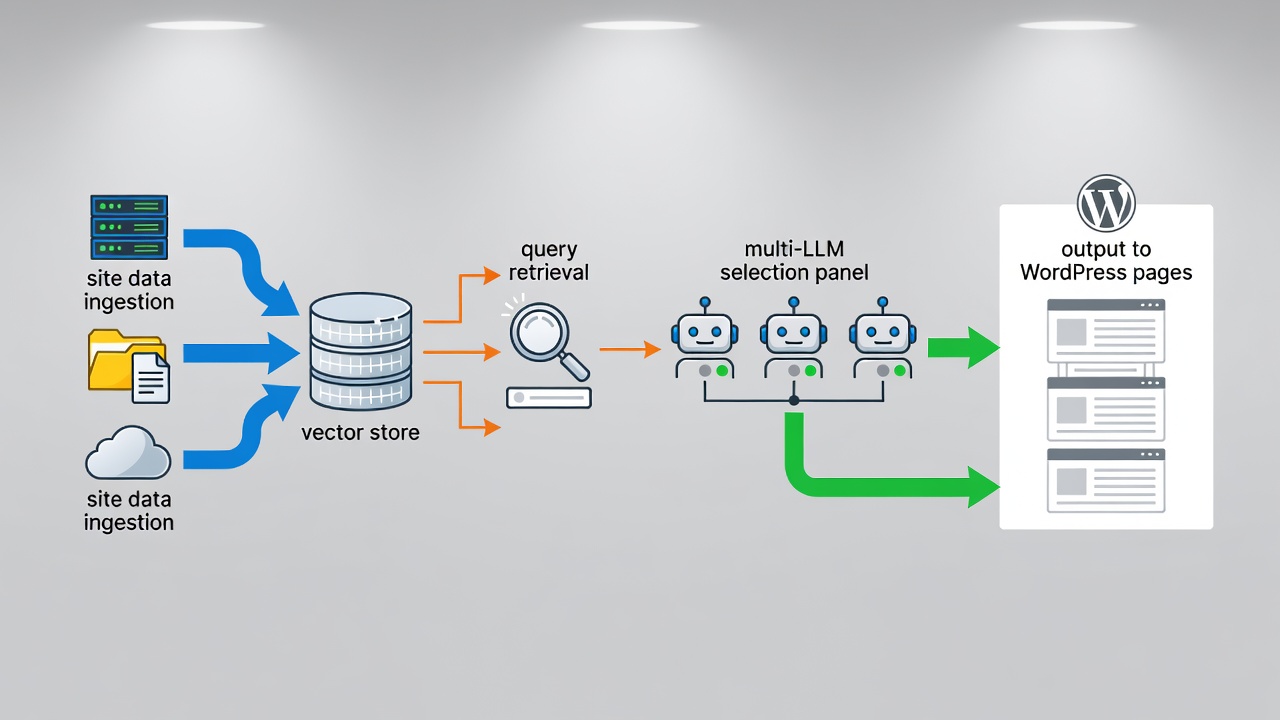
AIRAG pSEO Agent supplies three primary components that power effective RAG templates: multi-model LLM selection, knowledge base ingestion, and the autonomous scheduling engine. These elements work together to deliver enterprise-grade programmatic SEO automation directly inside WordPress.
Multi-Model LLM Selection
Users switch between Gemini for large context windows, GPT for creative phrasing, and Grok for real-time logic within the same dashboard. Each model receives the identical retrieved knowledge set, allowing precise tone and depth control per project. Gemini excels at massive context scenarios such as enterprise documentation hubs. GPT brings creative flair suitable for blog-style variations. Grok provides direct factual output ideal for technical or data-driven pages. This flexibility supports 40+ global languages with audience level and tone controls ranging from casual to formal.
Knowledge Base Ingestion
The plugin scans site pages, PDFs, and images to build a private retrieval index. This index supplies factual grounding for every generated programmatic page, ensuring content stays consistent with existing brand materials. Retrieval-Augmented Generation prevents the model from inventing details by limiting output to verified information from the indexed sources. In practice, this means uploading product sheets, service descriptions, and historical blog posts once, then letting the system reference them automatically for all future pages.
Autonomous Scheduling Engine
WP-Cron integration lets users define content cadence once. The scheduler then creates and publishes pages daily, weekly, or monthly without further intervention. This removes the need for constant manual oversight while maintaining a steady flow of fresh programmatic content. The system processes raw database sets and builds targeted landing grids at elite enterprise capacity.
| Model | Best Use Case | Context Window | Recommended Tone Control |
|---|---|---|---|
| Gemini | Large dataset programmatic hubs | 1M+ tokens | Formal enterprise |
| GPT | Creative blog-style pages | 128K tokens | Casual to professional |
| Grok | Real-time data logic | 32K tokens | Direct and factual |
Ready to deploy your first RAG template?
Start generating grounded programmatic pages today with AIRAG pSEO Agent.
Step-by-Step RAG Template Implementation Workflow
Begin by uploading core site documents and existing pages into the AIRAG pSEO Agent knowledge base. This step creates the retrieval foundation that every generated page will reference. Next, select the target LLM and define audience level plus tone. These choices determine the voice and depth of the output across all programmatic pages. Configure the scheduler for desired publishing frequency, then map parent-child page relationships for proper silo structure. The system automatically handles complex variation layouts and high-intent scale setups. Finally, review sample outputs and activate the automated generation queue. The entire workflow follows WordPress coding standards using hooks, filters, REST API, and AJAX for seamless integration.
Security remains a priority throughout. Input sanitization, nonces, and capability checks protect the site while the lightweight AJAX and WP-Cron processes minimize server load. Businesses leveraging this workflow report significant time savings and improved niche dominance through consistent, high-quality content output.
Video-to-Page RAG Template Applications
The Video-to-Page Intelligence feature accepts any YouTube URL. The system extracts the transcript and visual metadata, applies the chosen RAG template, and produces a long-form SEO-optimized article that maintains factual alignment with the original video content. This transforms passive video assets into active programmatic SEO pages that rank and attract citations. In practice, users upload educational or promotional videos once and receive multiple variations grounded in both the video data and existing site knowledge. The result supports unified programmatic and blog automation across the entire domain.
Common Pitfalls When Building RAG Templates
Many teams skip proper knowledge base curation, resulting in incomplete retrieval and shallow content. Others select overly creative models for technical topics, producing inaccurate claims that damage credibility. Insufficient scheduling review can also lead to duplicate or misaligned page structures that confuse search engines. Failing to test small batches before full rollout often wastes resources on low-performing templates. AIRAG pSEO Agent mitigates these issues through built-in security practices and dynamic content syncing that keeps everything optimized and lightweight.
Pro Tips for Maximizing RAG Template Performance
Maintain a clean, regularly updated knowledge base that includes the latest PDFs, images, and page content. Test multiple LLM combinations on small batches before full rollout to identify the best model for each content type. Use the companion SEO Agent module to generate supporting blog posts that link back to the main programmatic hubs. Monitor indexing and AI citation rates to refine retrieval queries over time. Leverage the ecosystem integration to keep organic domains connected through synchronized platform matrices. These practices turn the RAG template into a sustainable, long-term SEO asset that continues delivering value with minimal ongoing effort.
Connect with a specialist to configure your first RAG template for WordPress programmatic pages.
Related resources: Home – Best AI SEO & GEO WordPress Plugin for 2026 | Blog | Privacy Policy
