
AIRAG pSEO Agent is an all-in-one AI Content Engine that combines flagship LLMs such as OpenAI, Gemini, and Grok with a site’s unique knowledge base to generate SEO-optimized WordPress content on autopilot. In 2026, businesses seeking scalable content strategies increasingly rely on Retrieval-Augmented Generation to produce factually accurate articles that rank in both traditional search engines and AI-powered answer systems. This approach ensures every piece of content remains grounded in the specific data from a website’s pages, PDFs, and images rather than generic training data.
Table of Contents
- What Is AIRAG pSEO Agent and How Does It Differ from Standard AI Tools?
- How Retrieval-Augmented Generation Ensures Factually Grounded Content
- Video-to-Blog Intelligence: Converting YouTube Content into SEO Articles
- Autonomous Schedule Manager: Setting Up Hands-Free Content Publishing
- Global Brand Voice and Multi-Language Support Features
- WordPress-Native Architecture and Security Standards
- Frequently Asked Questions
What Is AIRAG pSEO Agent and How Does It Differ from Standard AI Tools?
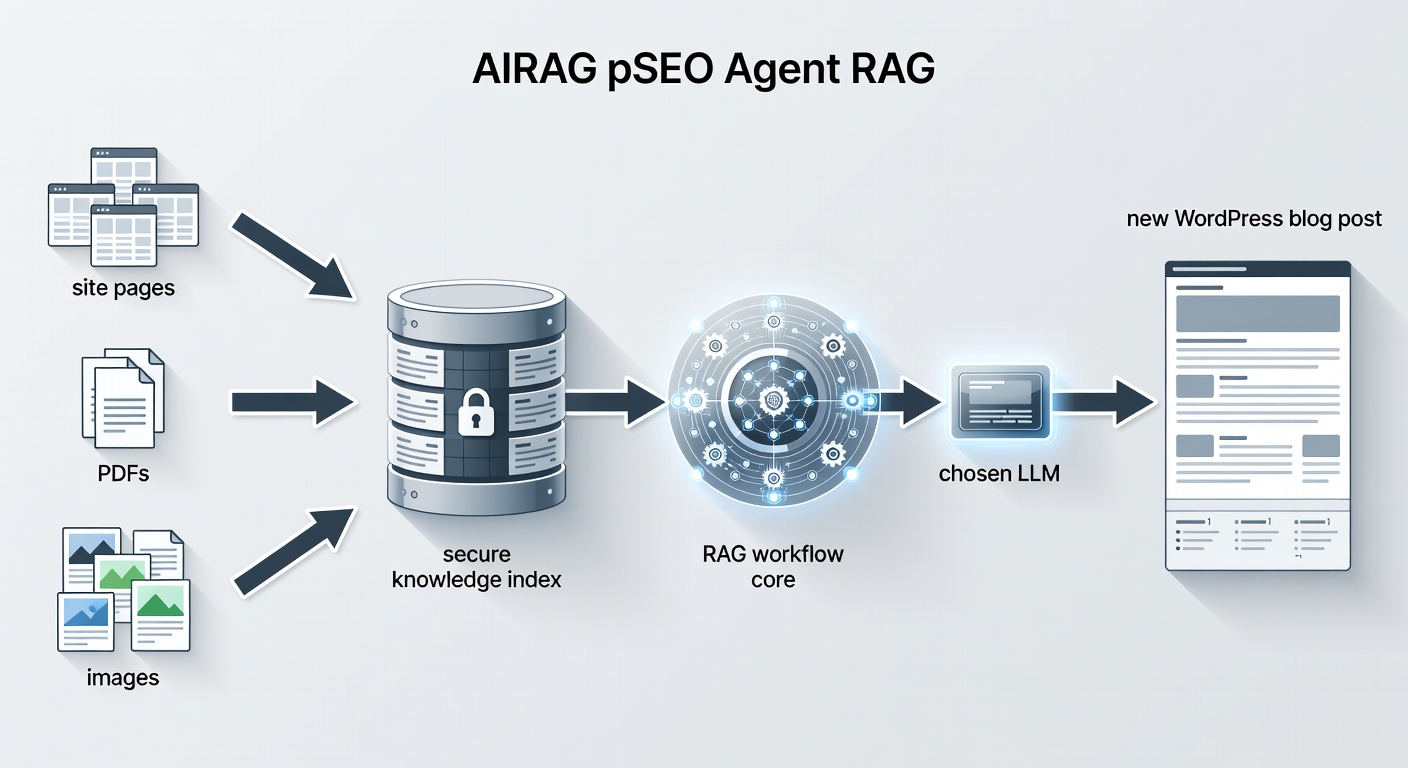
AIRAG pSEO Agent functions as a WordPress plugin that integrates multiple large language models through a single dashboard while anchoring output in site-specific data. Retrieval-Augmented Generation forms the core mechanism that separates this tool from generic AI writing platforms. The system first retrieves relevant passages from the site’s own content assets before supplying them to the chosen model for generation.
According to industry standards for modern content automation, this retrieval step dramatically improves factual accuracy. Users can switch between Gemini for handling large context windows, GPT for creative phrasing, and Grok for real-time logical reasoning without leaving the WordPress interface. In real-world implementations, this multi-model flexibility allows teams to match the right AI capability to each content type, such as technical documentation versus marketing copy.
Practical use cases include e-commerce sites that need product descriptions consistently aligned with existing catalog data. A SaaS company might use the plugin to repurpose knowledge base articles into new blog posts while preserving exact terminology from its own documentation. Experienced users often configure the knowledge index to prioritize recently updated pages so that generated content reflects current product features.
Common mistakes businesses make when first adopting the plugin include uploading unstructured PDFs that contain conflicting information. This can lead to diluted retrieval quality. A key strategy to consider is organizing source materials into clearly labeled sections before indexing begins.
- Define primary content sources such as product pages and support documentation.
- Test retrieval accuracy with short sample queries before full article generation.
- Monitor output for terminology consistency across multiple model switches.
How Retrieval-Augmented Generation Ensures Factually Grounded Content
Retrieval-Augmented Generation in AIRAG pSEO Agent works by first indexing the website’s own content assets and then referencing those assets during generation. The system extracts key information from uploaded PDFs, existing blog posts, and image metadata to create a temporary, secure knowledge context for each new article. This context is supplied to the selected LLM, ensuring that claims, statistics, and terminology align with the site’s established information.
A key benefit of this approach is improved citeability in AI search results. Content produced through RAG tends to include verifiable details that large language models can reference when answering user queries. Modern SEO practice shows that pages built on proprietary data sources receive higher visibility in conversational search interfaces because the underlying facts remain traceable to the original site.
According to current best practices for GEO optimization, grounding content in site-specific data increases the likelihood that AI Overviews will quote the generated articles directly. This occurs because the retrieval process supplies precise passages rather than relying on the model’s generalized knowledge.
Step-by-step implementation begins with uploading or selecting source materials within the plugin dashboard. Next, the system performs an initial index scan. Users then review sample retrieval results to confirm relevance. Finally, generation parameters such as target length and tone are set before triggering the first article.
Experienced developers often note that the quality of retrieved passages directly influences final output accuracy. When the knowledge base contains well-structured pages and clear product descriptions, the generated articles require fewer corrections and maintain stronger topical authority.
Real-world examples demonstrate success in the SaaS sector where companies maintain extensive documentation. By indexing support articles and feature pages, the plugin produces blog content that accurately explains complex workflows without introducing external inaccuracies.
A common pitfall involves neglecting to refresh the knowledge index after major site updates. Outdated source material leads to articles that no longer reflect current offerings. Regular re-indexing, ideally after each content addition, keeps retrieval results current.
- Index only high-quality, authoritative pages for best results.
- Use descriptive file names for PDFs to improve retrieval relevance.
- Verify generated citations match the original source text before publishing.
Video-to-Blog Intelligence: Converting YouTube Content into SEO Articles
AIRAG pSEO Agent’s video-to-blog feature accepts any public YouTube URL and transforms the video into a long-form, SEO-optimized article. The AI analyzes both the spoken transcript and available visual metadata such as on-screen text, thumbnails, and chapter titles. This dual analysis produces comprehensive posts that capture both the spoken narrative and the visual context of the original video.
The resulting articles follow current best practices for search optimization. They incorporate relevant headings, bullet lists, and keyword variations while preserving the educational intent of the source video. Site owners can therefore repurpose high-value video content into written assets that rank for informational queries without manual transcription or rewriting.
Implementation steps include pasting the YouTube URL into the dedicated field, selecting desired article length and tone, and choosing the LLM best suited for the topic. The system then processes the transcript alongside visual elements to create structured output. Users review the draft for accuracy and publish directly to WordPress.
Practical applications appear frequently with educational channels that maintain both video and blog presences. A technology review site, for example, can convert product demonstration videos into detailed comparison articles that target long-tail search terms. This dual-format strategy strengthens topical authority across multiple content types.
One common mistake is selecting videos with poor audio quality or heavy accents, which can reduce transcript accuracy. Testing short clips first helps identify suitable source material. Another consideration involves ensuring the generated article adds unique value beyond the video, such as additional context or related examples drawn from the site’s knowledge base.
- Choose videos with clear narration and structured chapters.
- Combine video insights with site-specific data for differentiated content.
- Optimize headings for both search engines and AI answer blocks.
Autonomous Schedule Manager: Setting Up Hands-Free Content Publishing
The Autonomous Schedule Manager uses WordPress’s native WP-Cron system to handle recurring content generation. Users define a content strategy once by selecting topics, target keywords, preferred tone, and publishing frequency. After setup, the scheduler automatically triggers article creation and publication on daily, weekly, or monthly intervals.
This automation reduces the manual workload associated with maintaining a consistent publishing cadence. Because the system remains integrated with WordPress hooks and filters, generated posts inherit the site’s existing taxonomies, featured image settings, and SEO plugin configurations without additional configuration.
Configuration begins with accessing the scheduler settings in the plugin dashboard. Users then create a content plan that specifies primary and secondary keywords, desired article length, and model preferences. Frequency options range from daily posts for high-volume sites to monthly updates for more specialized topics. The WP-Cron system executes these tasks in the background.
Real-world use cases include news-style blogs that require regular updates on industry trends. An e-commerce site might schedule monthly product education articles drawn from its catalog data. These automated workflows free marketing teams to focus on promotion rather than production.
According to WordPress development standards, reliance on the native cron system ensures compatibility with hosting environments that support standard WordPress installations. A common pitfall is setting overly aggressive publishing frequencies without monitoring site performance. Starting with weekly intervals and adjusting based on traffic patterns provides a balanced approach.
- Align publishing frequency with available resources for promotion.
- Review a sample generated post before enabling full automation.
- Monitor server load during initial scheduled runs.
Global Brand Voice and Multi-Language Support Features
AIRAG pSEO Agent supports more than 40 languages and provides granular controls for audience level and tone. Site administrators can specify whether content should adopt a casual, professional, or technical voice and can adjust reading level to match target readers. These settings apply consistently across all generated posts, preserving brand identity even when publishing in multiple languages.
The language controls operate at the generation stage rather than through post-processing translation. This method helps maintain natural phrasing and cultural nuance because each language model receives explicit instructions about desired tone before producing text.
Step-by-step setup involves selecting the target language, defining audience expertise level, and choosing tone descriptors such as friendly or authoritative. The plugin applies these parameters uniformly to every scheduled or on-demand generation task. This consistency proves especially valuable for international brands managing regional content variations.
Practical examples include global SaaS companies that publish documentation in English, Spanish, and German simultaneously. Each version maintains the same technical depth while adapting phrasing for local audiences. Businesses report reduced translation costs and faster time-to-publish when using these built-in controls.
A frequent oversight is applying inconsistent tone settings across different content categories. Establishing a brand voice guideline document and referencing it during configuration prevents this issue. Regular audits of published articles help confirm that the chosen settings produce the intended voice.
- Test sample generations in each target language before full rollout.
- Document tone guidelines for team-wide consistency.
- Adjust audience level settings based on analytics for each region.
WordPress-Native Architecture and Security Standards
AIRAG pSEO Agent follows official WordPress coding standards and relies on established APIs including hooks, filters, the REST API, and AJAX for all operations. The plugin remains lightweight by performing heavy processing asynchronously and minimizing database queries through efficient caching.
Security receives priority through input sanitization, nonce verification, and capability checks that align with WordPress security best practices. These measures prevent unauthorized access and protect against common injection vulnerabilities while allowing seamless integration with existing themes and plugins.
Implementation follows standard WordPress plugin activation procedures. After activation, users configure API keys for the chosen LLMs within the secure dashboard. The system then indexes selected content sources using AJAX calls that avoid interrupting site performance. Ongoing operations rely on WP-Cron for scheduled tasks and REST endpoints for dashboard interactions.
Real-world deployments demonstrate compatibility with popular page builders and SEO plugins. Sites using caching layers report no conflicts when the plugin operates within its designed lightweight parameters. Security audits confirm that nonce and capability protections function as intended across different user roles.
According to WordPress coding standards, adherence to these practices ensures long-term maintainability and reduces the risk of conflicts during core updates. A common mistake involves granting excessive user capabilities during initial setup. Limiting access to administrators and editors maintains proper security boundaries.
- Review capability settings after each plugin update.
- Test integration with existing security plugins before production use.
- Keep the knowledge base index current to avoid serving outdated generated content.
| Feature | AIRAG pSEO Agent | Traditional AI Content Plugins |
|---|---|---|
| Retrieval-Augmented Generation | Yes – scans site PDFs, pages, and images | No – relies on generic model knowledge |
| Multi-LLM Access | Switch between OpenAI, Gemini, Grok | Usually limited to single provider |
| Video-to-Blog Conversion | Yes – analyzes transcripts and visuals | Rarely available |
| Autonomous Scheduling | WP-Cron integrated, fully automatic | Manual or limited cron options |
| Language & Tone Controls | 40+ languages with audience-level settings | Basic language support only |
Frequently Asked Questions
How does AIRAG pSEO Agent use my existing site content? The plugin indexes pages, PDFs, and images to build a secure knowledge base that Retrieval-Augmented Generation references during article creation, ensuring factual alignment with the site’s own data.
Which AI models are available inside the plugin? Users can switch between OpenAI, Gemini, and Grok directly from the WordPress dashboard to match different content requirements such as context size, creativity, or logical reasoning.
Is the scheduler fully automatic after setup? Yes. Once a content strategy is defined, the WP-Cron integrated scheduler handles generation and publishing on the chosen daily, weekly, or monthly schedule without further manual input.
Does AIRAG pSEO Agent follow WordPress security best practices? The plugin implements input sanitization, nonce verification, and capability checks while adhering to official WordPress coding standards for secure integration.
Businesses ready to automate high-quality, site-specific content can explore AIRAG pSEO Agent at https://airagseo.com/about/ and begin generating ranking articles with their own data today.